
Using Tabula Sapiens as a reference for annotating new datasets#
This notebook allows you to annotate your data with a number of annotation methods using the Tabula Sapiens dataset as the reference.
Initial setup: Using pre-trained models is only supported in python 3.11 due to inconsistencies in pickle. If Google Colab updates their python version, we will also update our pretrained models.
Integration Methods Provided:
scVI (Lopez et al. 2018)
bbKNN (Polański et al. 2020)
Scanorama (He et al. 2019)
Harmony (Korsunsky et al. 2019)
Annotation Methods:
KNN on integrated spaces
scANVI (Xu et al. 2021)
OnClass (Wang et al. 2020)
Celltypist (Dominguez Conde et al. 2022)
SVM
RandomForest
XGboost
To use the notebook, simply connect to your Google Drive account, set the necessary arguments, select your methods, and run all the code blocks!
Last edited: 01/23/2025
!pip install -q "popv @ git+https://github.com/YosefLab/popv.git@faiss_nn"
  Installing build dependencies ... ?25l?25hdone
  Getting requirements to build wheel ... ?25l?25hdone
  Preparing metadata (pyproject.toml) ... ?25l?25hdone
     ━━━━━━━━━━━━━━━━━━━━━━━━━━━━━━━━━━━━━━━━ 45.1/45.1 kB 2.0 MB/s eta 0:00:00
     ━━━━━━━━━━━━━━━━━━━━━━━━━━━━━━━━━━━━━━ 647.5/647.5 kB 12.9 MB/s eta 0:00:00
?25h  Preparing metadata (setup.py) ... ?25l?25hdone
  Preparing metadata (setup.py) ... ?25l?25hdone
  Preparing metadata (setup.py) ... ?25l?25hdone
  Preparing metadata (setup.py) ... ?25l?25hdone
   ━━━━━━━━━━━━━━━━━━━━━━━━━━━━━━━━━━━━━━━━ 169.9/169.9 kB 13.2 MB/s eta 0:00:00
   ━━━━━━━━━━━━━━━━━━━━━━━━━━━━━━━━━━━━━━━━ 7.3/7.3 MB 88.3 MB/s eta 0:00:00
   ━━━━━━━━━━━━━━━━━━━━━━━━━━━━━━━━━━━━━━━━ 2.0/2.0 MB 81.8 MB/s eta 0:00:00
   ━━━━━━━━━━━━━━━━━━━━━━━━━━━━━━━━━━━━━━━━ 2.1/2.1 MB 83.9 MB/s eta 0:00:00
   ━━━━━━━━━━━━━━━━━━━━━━━━━━━━━━━━━━━━━━━━ 55.6/55.6 kB 4.6 MB/s eta 0:00:00
   ━━━━━━━━━━━━━━━━━━━━━━━━━━━━━━━━━━━━━━━━ 31.4/31.4 MB 64.2 MB/s eta 0:00:00
   ━━━━━━━━━━━━━━━━━━━━━━━━━━━━━━━━━━━━━━━━ 183.6/183.6 kB 16.6 MB/s eta 0:00:00
   ━━━━━━━━━━━━━━━━━━━━━━━━━━━━━━━━━━━━━━━━ 627.5/627.5 kB 34.8 MB/s eta 0:00:00
   ━━━━━━━━━━━━━━━━━━━━━━━━━━━━━━━━━━━━━━━━ 58.2/58.2 kB 5.4 MB/s eta 0:00:00
   ━━━━━━━━━━━━━━━━━━━━━━━━━━━━━━━━━━━━━━━━ 4.4/4.4 MB 110.1 MB/s eta 0:00:00
   ━━━━━━━━━━━━━━━━━━━━━━━━━━━━━━━━━━━━━━━━ 828.5/828.5 kB 58.8 MB/s eta 0:00:00
   ━━━━━━━━━━━━━━━━━━━━━━━━━━━━━━━━━━━━━━━━ 199.3/199.3 kB 18.9 MB/s eta 0:00:00
   ━━━━━━━━━━━━━━━━━━━━━━━━━━━━━━━━━━━━━━━━ 259.4/259.4 kB 21.6 MB/s eta 0:00:00
   ━━━━━━━━━━━━━━━━━━━━━━━━━━━━━━━━━━━━━━━━ 21.2/21.2 MB 35.0 MB/s eta 0:00:00
   ━━━━━━━━━━━━━━━━━━━━━━━━━━━━━━━━━━━━━━━━ 983.2/983.2 kB 51.8 MB/s eta 0:00:00
   ━━━━━━━━━━━━━━━━━━━━━━━━━━━━━━━━━━━━━━━━ 276.4/276.4 kB 21.0 MB/s eta 0:00:00
   ━━━━━━━━━━━━━━━━━━━━━━━━━━━━━━━━━━━━━━━━ 76.7/76.7 kB 6.7 MB/s eta 0:00:00
   ━━━━━━━━━━━━━━━━━━━━━━━━━━━━━━━━━━━━━━━━ 41.9/41.9 kB 3.2 MB/s eta 0:00:00
   ━━━━━━━━━━━━━━━━━━━━━━━━━━━━━━━━━━━━━━━━ 756.0/756.0 kB 46.7 MB/s eta 0:00:00
   ━━━━━━━━━━━━━━━━━━━━━━━━━━━━━━━━━━━━━━━━ 85.4/85.4 kB 7.1 MB/s eta 0:00:00
   ━━━━━━━━━━━━━━━━━━━━━━━━━━━━━━━━━━━━━━━━ 8.8/8.8 MB 124.4 MB/s eta 0:00:00
   ━━━━━━━━━━━━━━━━━━━━━━━━━━━━━━━━━━━━━━━━ 832.4/832.4 kB 51.1 MB/s eta 0:00:00
   ━━━━━━━━━━━━━━━━━━━━━━━━━━━━━━━━━━━━━━━━ 14.0/14.0 MB 112.9 MB/s eta 0:00:00
   ━━━━━━━━━━━━━━━━━━━━━━━━━━━━━━━━━━━━━━━━ 53.5/53.5 kB 4.5 MB/s eta 0:00:00
?25h  Building wheel for popv (pyproject.toml) ... ?25l?25hdone
  Building wheel for annoy (setup.py) ... ?25l?25hdone
  Building wheel for docrep (setup.py) ... ?25l?25hdone
  Building wheel for fbpca (setup.py) ... ?25l?25hdone
  Building wheel for intervaltree (setup.py) ... ?25l?25hdone
ERROR: pip's dependency resolver does not currently take into account all the packages that are installed. This behaviour is the source of the following dependency conflicts.
gcsfs 2025.3.0 requires fsspec==2025.3.0, but you have fsspec 2025.9.0 which is incompatible.
datasets 4.0.0 requires fsspec[http]<=2025.3.0,>=2023.1.0, but you have fsspec 2025.9.0 which is incompatible.
Step 1: Setup environment (Restart Notebook after installation)#
We omit the output of those lines for readability. First we change the encoding to UTF8 - python default.
import os

os.environ["PYTHONUTF8"] = "1"
os.environ["SCIPY_ARRAY_API"] = "1"
import pandas as pd
import popv
import scanpy as sc
popV provides setting in popv.settings. If you have a GPU and a large dataset, specifically set popv.cuml = True after installing a GPU enabled version of faiss and rapids_singlecell. This will use GPU-accelerated code in popV and can be an order faster.
Step 2: Load your data (User Action Required)#
Here we provide three options to load your data:
Connect to Google Drive (highly recommended)
Download your data from the cloud and save into this session or on Google drive.
Upload your data manually into this session (files are not persistent and will be deleted when session is closed)
As an example, we use a subsampled version of the Lung Cell Atlas [1] for our query data.
[1] Travaglini, K. et al. A molecular cell atlas of the human lung from single-cell RNA sequencing. Nature 587, 619–625(2020).
input_file = {
    "source": "cellxgene",
    "path": "tmp/LCA.h5ad",
    "url": "https://cellxgene.cziscience.com/e/8c42cfd0-0b0a-46d5-910c-fc833d83c45e.cxg/",
}
os.makedirs(os.path.dirname(input_file["path"]), exist_ok=True)

if input_file["source"] == "gdrive":
    # OPTION 1: Connect to Google Drive.
    from google.colab import drive

    drive.mount("/content/drive")
    query_adata = sc.read(input_file["path"])
elif input_file["source"] == "cellxgene":
    # OPTION 2: Download from CELLxGENE URL.
    import cellxgene_census

    try:  # CELLxGENE throws error if file exists.
        cellxgene_census.download_source_h5ad(
            dataset_id=input_file["url"].rsplit("/", 2)[1].rsplit(".")[0],
            census_version="stable",
            to_path=input_file["path"],
        )
    except ValueError:
        pass
    query_adata = sc.read_h5ad(input_file["path"])
else:
    query_adata = sc.read(input_file["path"], backup_url=input_file["url"])

query_adata.obs_names_make_unique()
# Downsample to reduce RAM usage. Not necessary with Google Colab Pro.
sc.pp.subsample(query_adata, 0.2)
# CELLxGENE census stores normalized counts in adata.X and raw counts in adata.raw.X. We need raw counts.
query_adata.X = query_adata.raw.X
query_adata.X.data
Step 3 (User Action Required): Setting Up Annotation Parameters#
Here is where you set the parameters for the automated annotation.
Arguments:
huggingface_repo: Reference model to use. See hugingface for further information (https://huggingface.co/popV).
save_location: location to save results to. By default will save to a folder named
annotation_results. It is highly recommended you provide a Google Drive folder here.query_batch_key: key in
query_adata.obsfor batch correction. Set to None for no batch correction.algorithms: these are the methods to run. By default, will run all methods provided for the reference data. Options: [“knn_on_scvi_pred”, “scanvi_pred”, “knn_on_bbknn_pred”, “svm_pred”, “rf_pred”, “onclass_pred”, “knn_on_scanorama_pred”.
huggingface_repo = "popV/Tabula_Sapiens4_Lung"
query_batch_key = "donor_id"
algorithms = None
Step 4: Perform annotation#
No more user input required! Just run all the following code blocks.
Optional: Train model from scratch.#
We provide pretrained models based on Tabula sapiens on huggingface. In case, you want to train popV on your own data this commented code block provides all arguments to do so.
# from huggingface_hub import snapshot_download

# snapshot_download(repo_id="popV/ontology", repo_type="dataset", local_dir="tmp/ontology")

# cellxgene_census.download_source_h5ad(
#     dataset_id="0d2ee4ac-05ee-40b2-afb6-ebb584caa867",
#     census_version="stable",
#     to_path="tmp/tabula_sapiens_lung.h5ad",
# )

# ref_adata = sc.read("tmp/tabula_sapiens_lung.h5ad")
# ref_adata.X = ref_adata.raw.X # Get count data in CELLxGENE data.

# # popv.settings.cuml = True # Optional to speed up training
# popv.settings.n_jobs = 10

# output_folder = "tmp/annotation_results"
# os.makedirs(output_folder, exist_ok=True)
# ref_labels_key = "cell_type"
# unknown_celltype_label = "unassigned"  # Label of unlabeled cells
# n_samples_per_label = 100 # Downsamples for some classifiers the dataset.

# query_adata.obs['batch_key'] = query_adata.obs.apply(lambda row: row['donor_id'] + '_' + row['assay'] + '_' + row['tissue'], axis=1)
# ref_adata.obs['batch_key'] = ref_adata.obs.apply(lambda row: row['donor_id'] + '_' + row['assay'] + '_' + row['tissue'], axis=1)
# adata = popv.preprocessing.Process_Query(
#     query_adata,
#     ref_adata,
#     query_batch_key="batch_key",
#     ref_labels_key=ref_labels_key,
#     ref_batch_key="batch_key",
#     unknown_celltype_label=unknown_celltype_label,
#     save_path_trained_models=output_folder,
#     cl_obo_folder="tmp/ontology/",
#     prediction_mode="retrain",
#     n_samples_per_label=n_samples_per_label,
#     hvg=4000,
# ).adata

# popv.annotation.annotate_data(
#     adata,
#     save_path=f"{output_folder}/popv_output",
# )
huggingface_repo = "popV/tabula_sapiens4_Lung"
hmo = popv.hub.HubModel.pull_from_huggingface_hub(huggingface_repo, cache_dir="tmp/tabula_sapiens")
adata = hmo.annotate_data(
    query_adata,
    query_batch_key=query_batch_key,
    prediction_mode="inference",  # "fast" does not integrate reference and query.
    # gene_symbols="feature_name", # "Uncomment if using gene symbols."
)
LLLLLL tmp/tabula_sapiens/models--popV--Tabula_Sapiens3_Lung/snapshots/195d83ca3a06bb045e3b66061650aa5de7094d64 ['checkpoint', 'preprocessing.json', 'OnClass.npz', 'svm_classifier.joblib', 'OnClass.meta', 'metadata.json', 'faiss_index.index', 'OnClass.index', 'README.md', 'accuracies.json', 'OnClass.data-00000-of-00001', 'minified_ref_adata.h5ad', 'obo_dag.joblib', '.gitattributes', 'scvi_knn_classifier.index', 'scanvi', 'popv_output', 'celltypist.pkl', 'scvi', 'ref_labels.csv', 'harmony_knn_classifier.index', 'xgboost_classifier.model']
INFO     Found 92.10000000000001% reference vars in query data.
WARNING: consider updating your call to make use of `computation`
INFO     File
         tmp/tabula_sapiens/models--popV--Tabula_Sapiens3_Lung/snapshots/195d83ca3a06bb045e3b66061650aa5de7094d64/s
         cvi/model.pt already downloaded
Retraining scvi for 51 epochs.
INFO     File
         tmp/tabula_sapiens/models--popV--Tabula_Sapiens3_Lung/snapshots/195d83ca3a06bb045e3b66061650aa5de7094d64/s
         canvi/model.pt already downloaded
INFO     Training for 20 epochs.
INFO     Received view of anndata, making copy.
INFO     Input AnnData not setup with scvi-tools. attempting to transfer AnnData setup
INFO     Received view of anndata, making copy.
INFO     Input AnnData not setup with scvi-tools. attempting to transfer AnnData setup
# Optional: save the full anndata will all objects
# adata.write(f'{output_folder}/query_and_reference_popv.h5ad')
# Optional: save the full anndata will all objects
# adata.write(f'{output_folder}/query_and_reference_popv.h5ad')
list(adata.uns["prediction_keys"])
['popv_celltypist_prediction',
 'popv_knn_bbknn_prediction',
 'popv_knn_harmony_prediction',
 'popv_knn_on_scvi_prediction',
 'popv_onclass_prediction',
 'popv_scanvi_prediction',
 'popv_svm_prediction',
 'popv_xgboost_prediction']
cell_types = pd.unique(adata.obs[list(adata.uns["prediction_keys_seen"]) + ["cell_type"]].values.ravel("K"))
palette = sc.plotting.palettes.default_102
celltype_colors = dict(zip(list(cell_types), palette, strict=False))
adata.obsm["X_umap"] = adata.obsm["X_umap_scanvi_popv"]

sc.pl.umap(
    adata,
    color=[
        "popv_knn_harmony_prediction",
        "popv_knn_on_scvi_prediction",
        "popv_celltypist_prediction",
        "popv_scanvi_prediction",
        "cell_type",
    ],
    palette=celltype_colors,
    ncols=1,
)

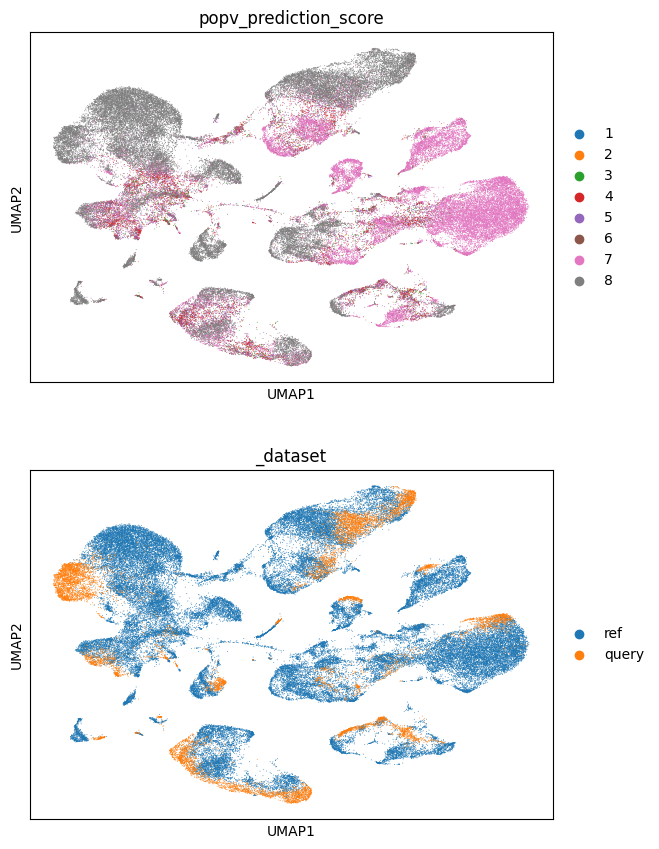
sc.pl.umap(
    adata,
    color=["popv_prediction_score", "_dataset"],
    ncols=1,
)

sc.pl.umap(
    adata[adata.obs["_dataset"] == "query"],
    color=[
        "popv_prediction",
        "popv_prediction_score",
    ],
    ncols=1,
)

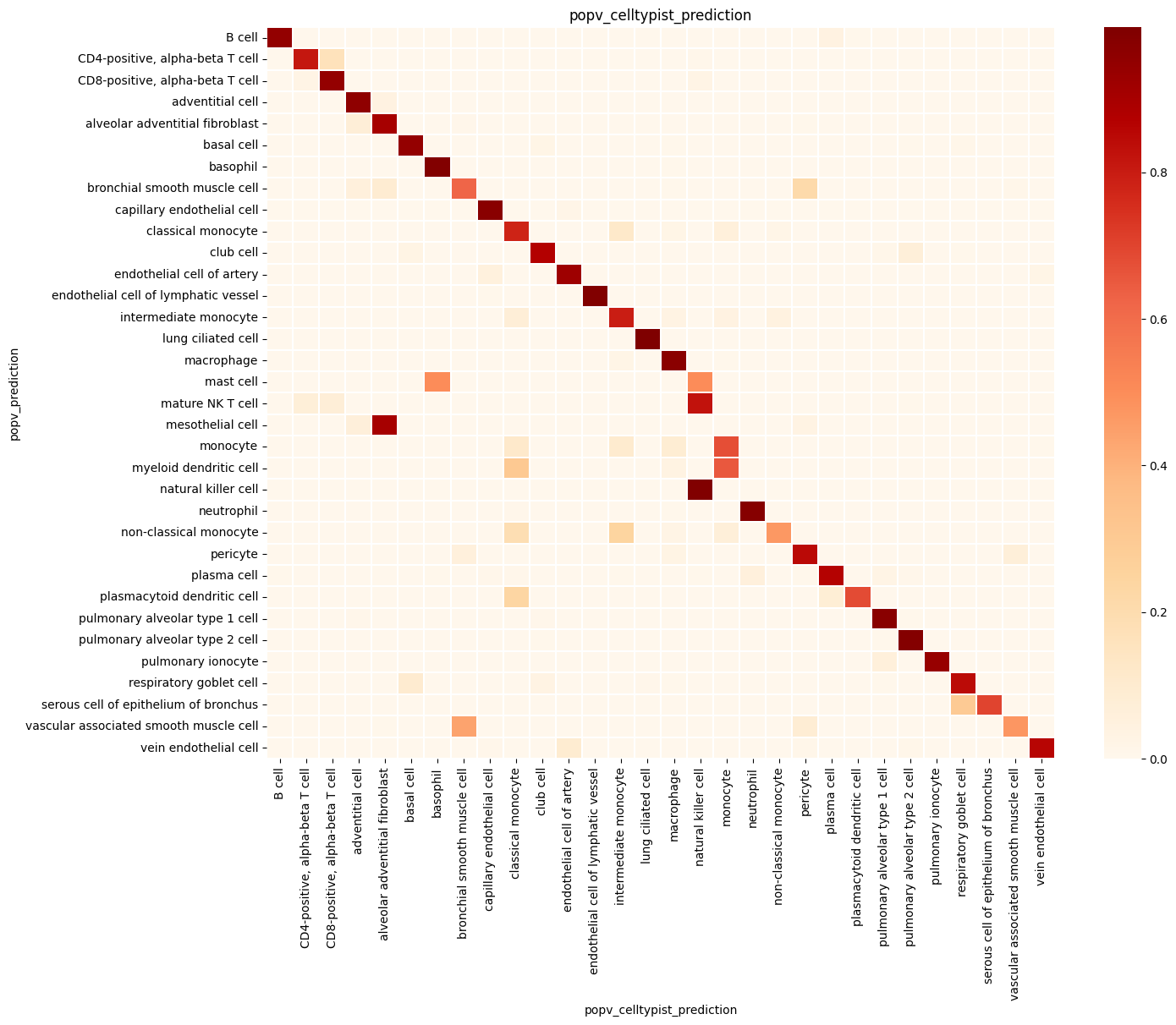
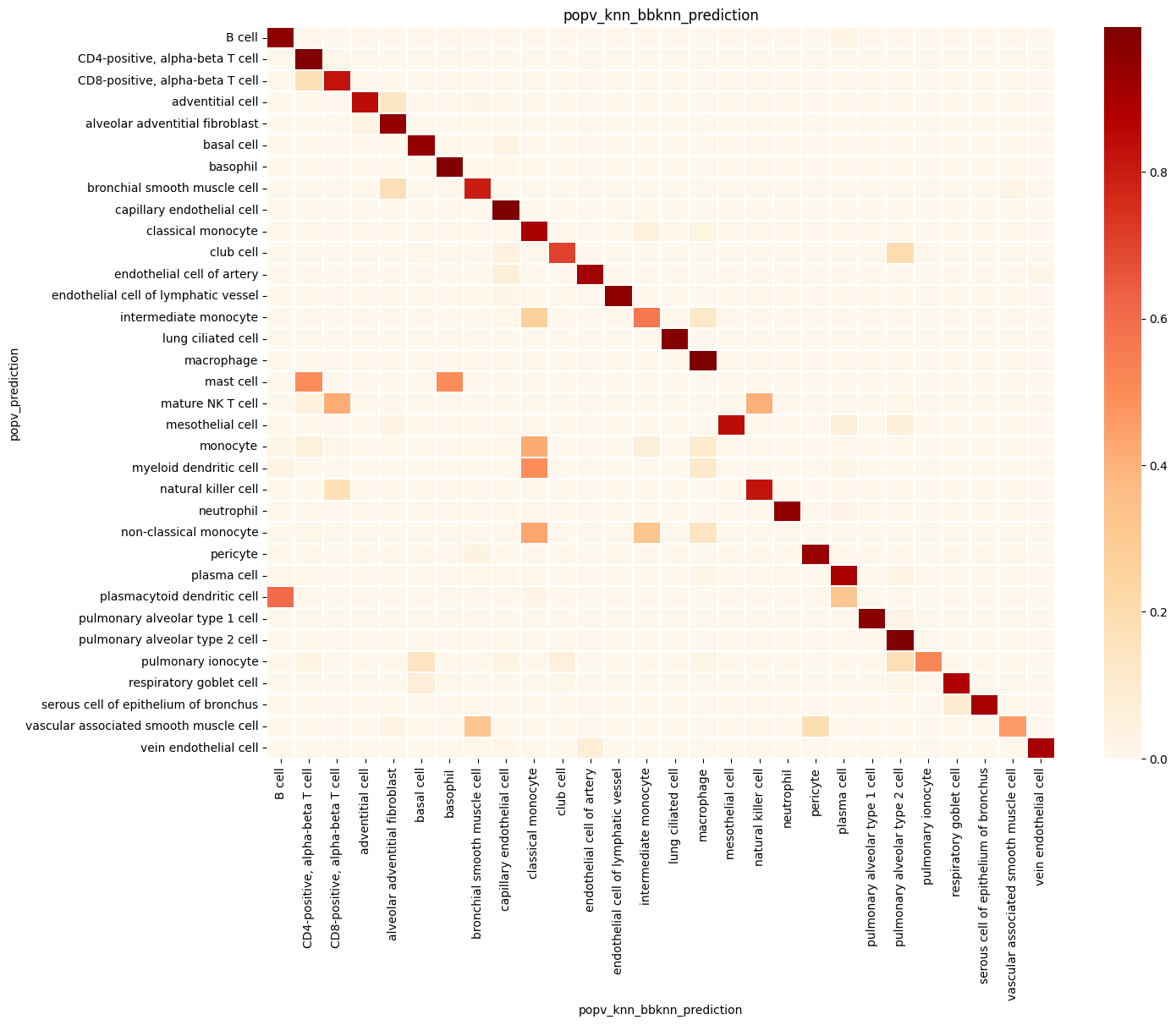
Step 6: Summary Statistics#
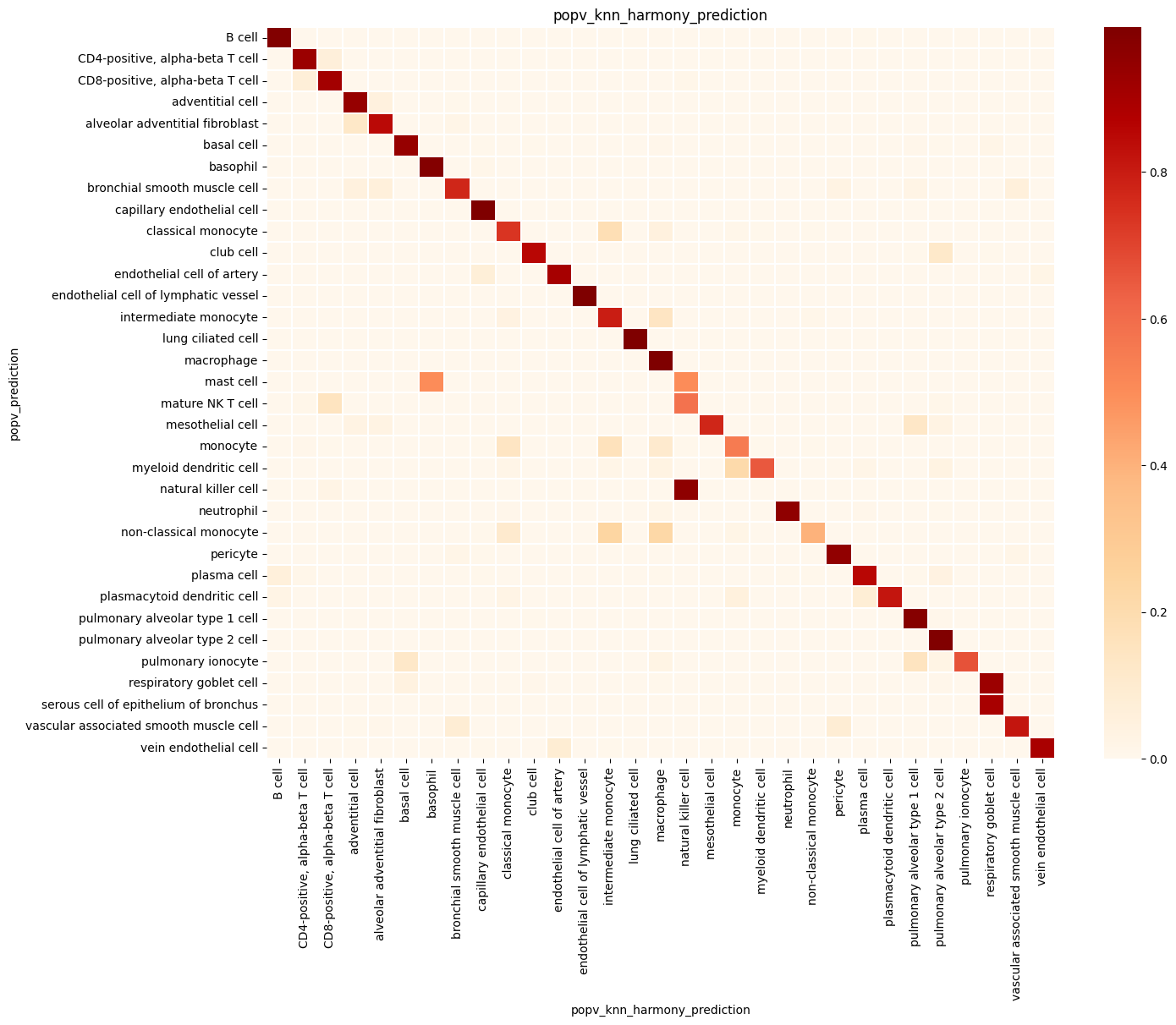
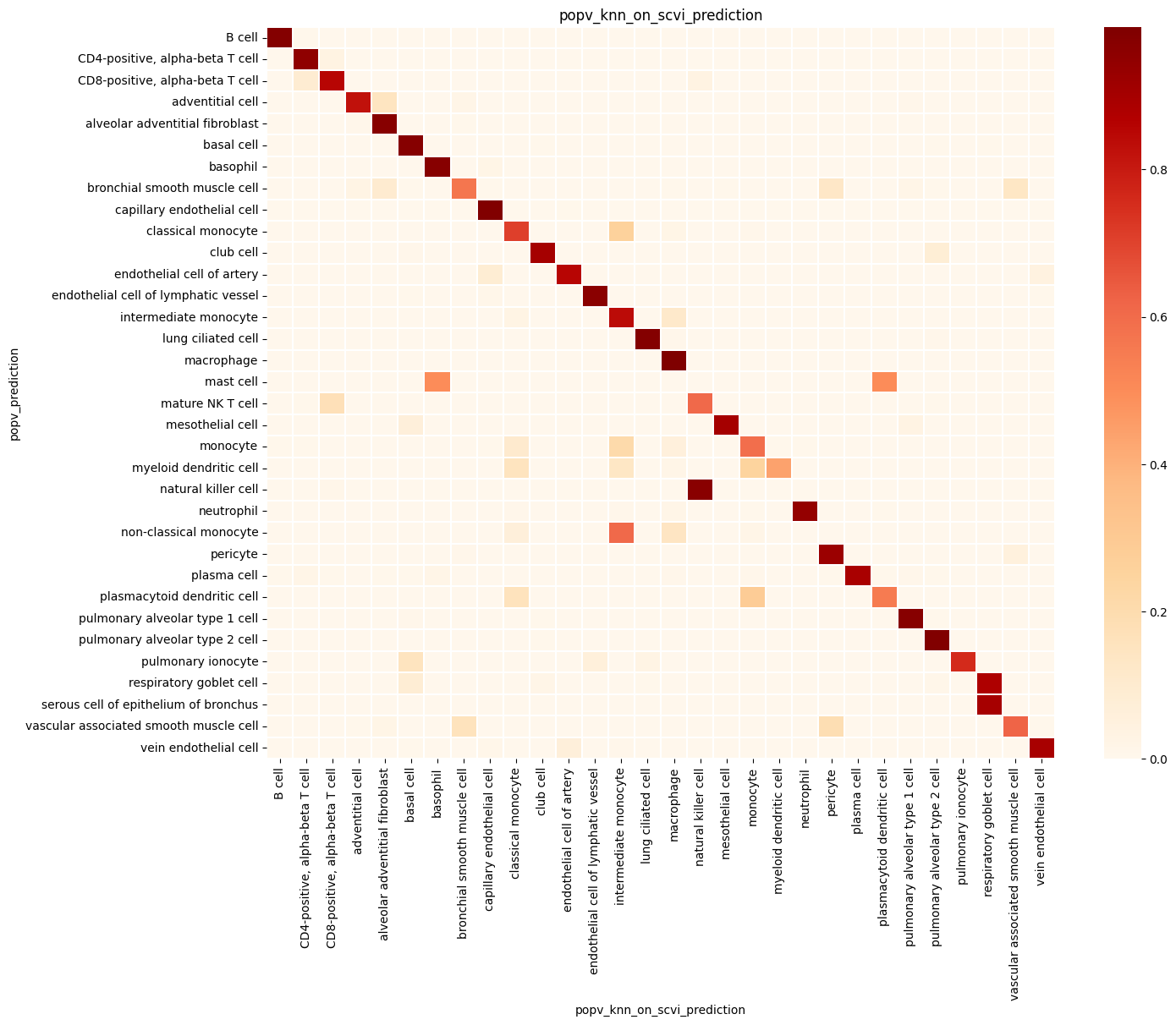
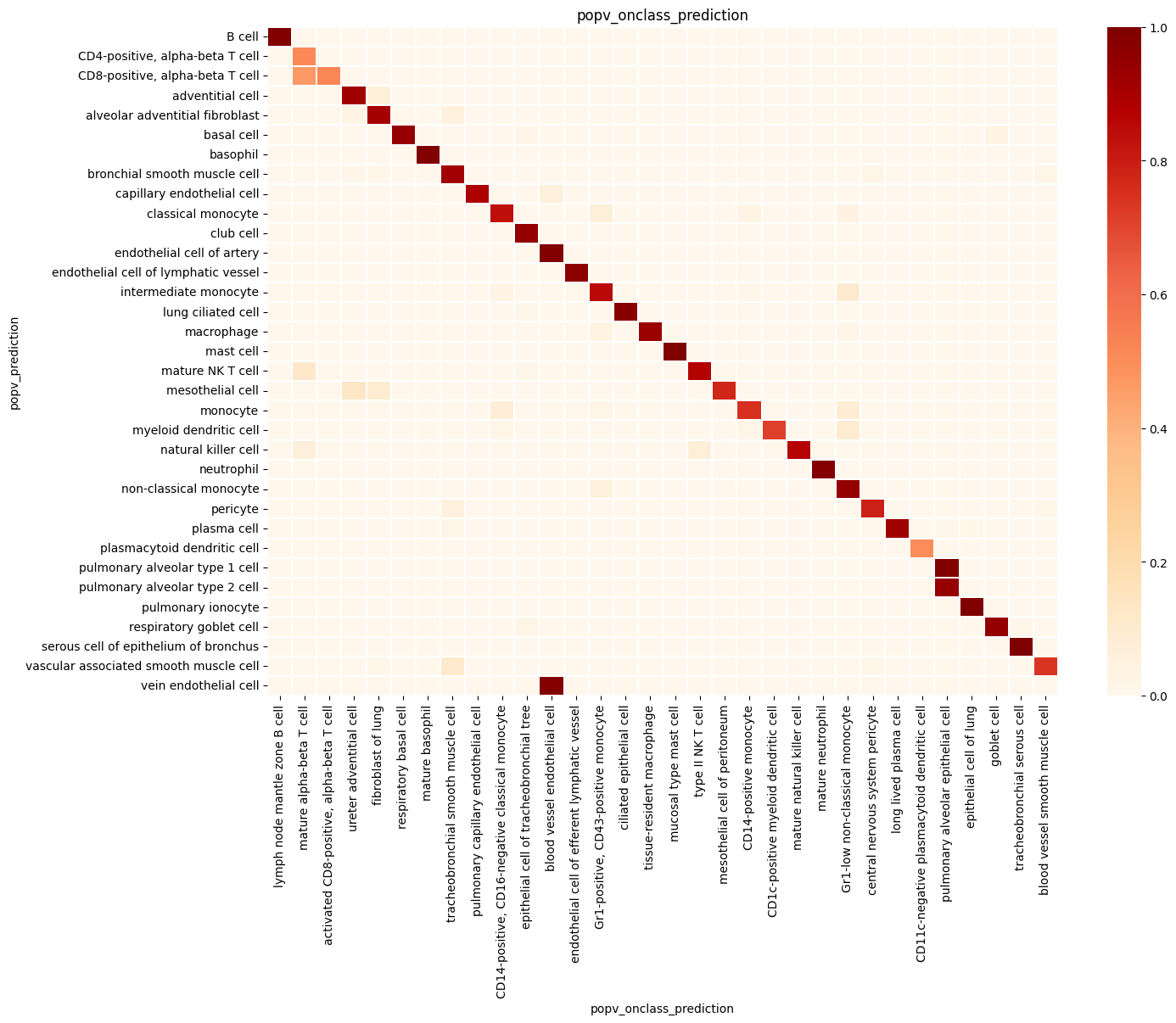
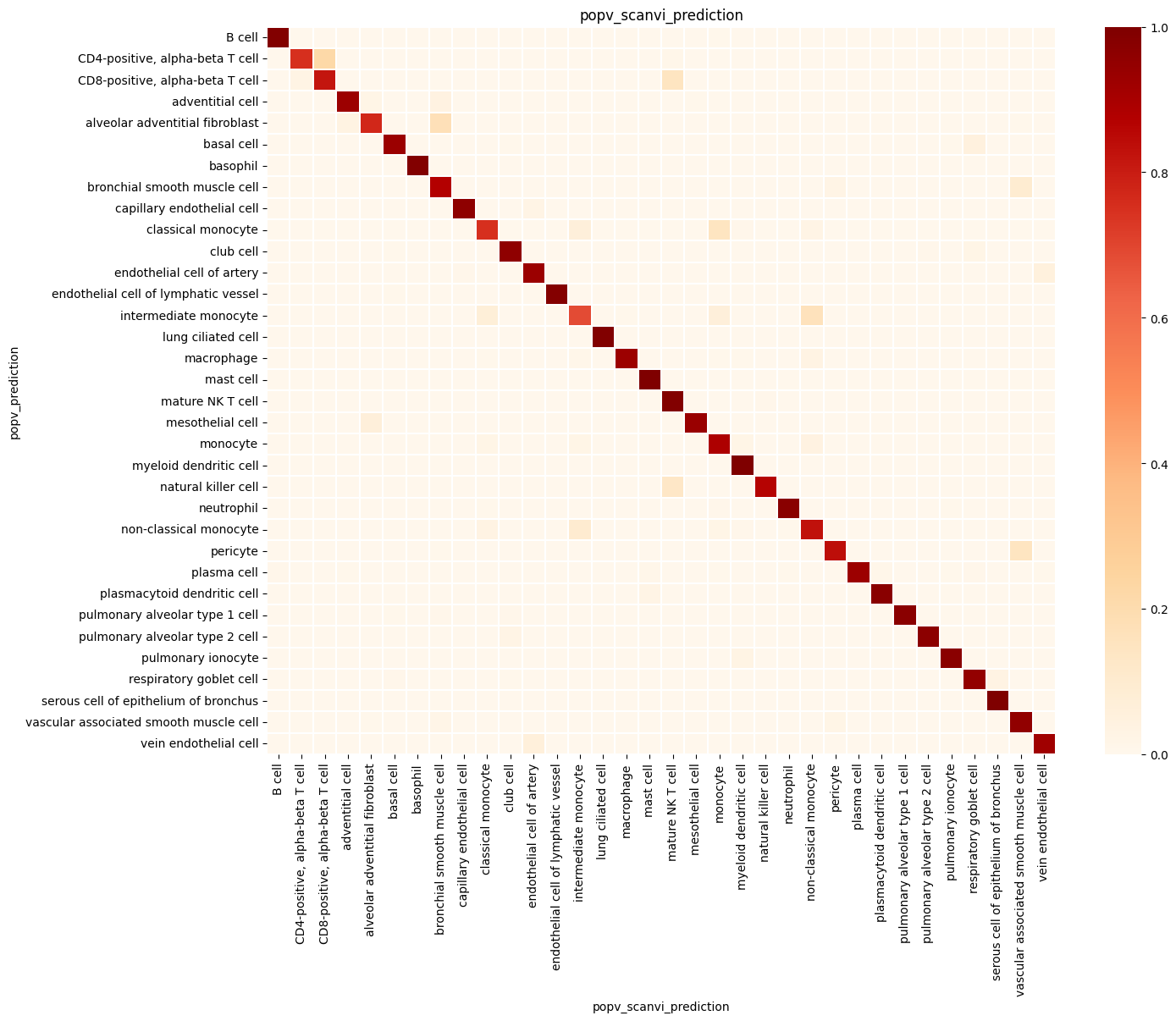
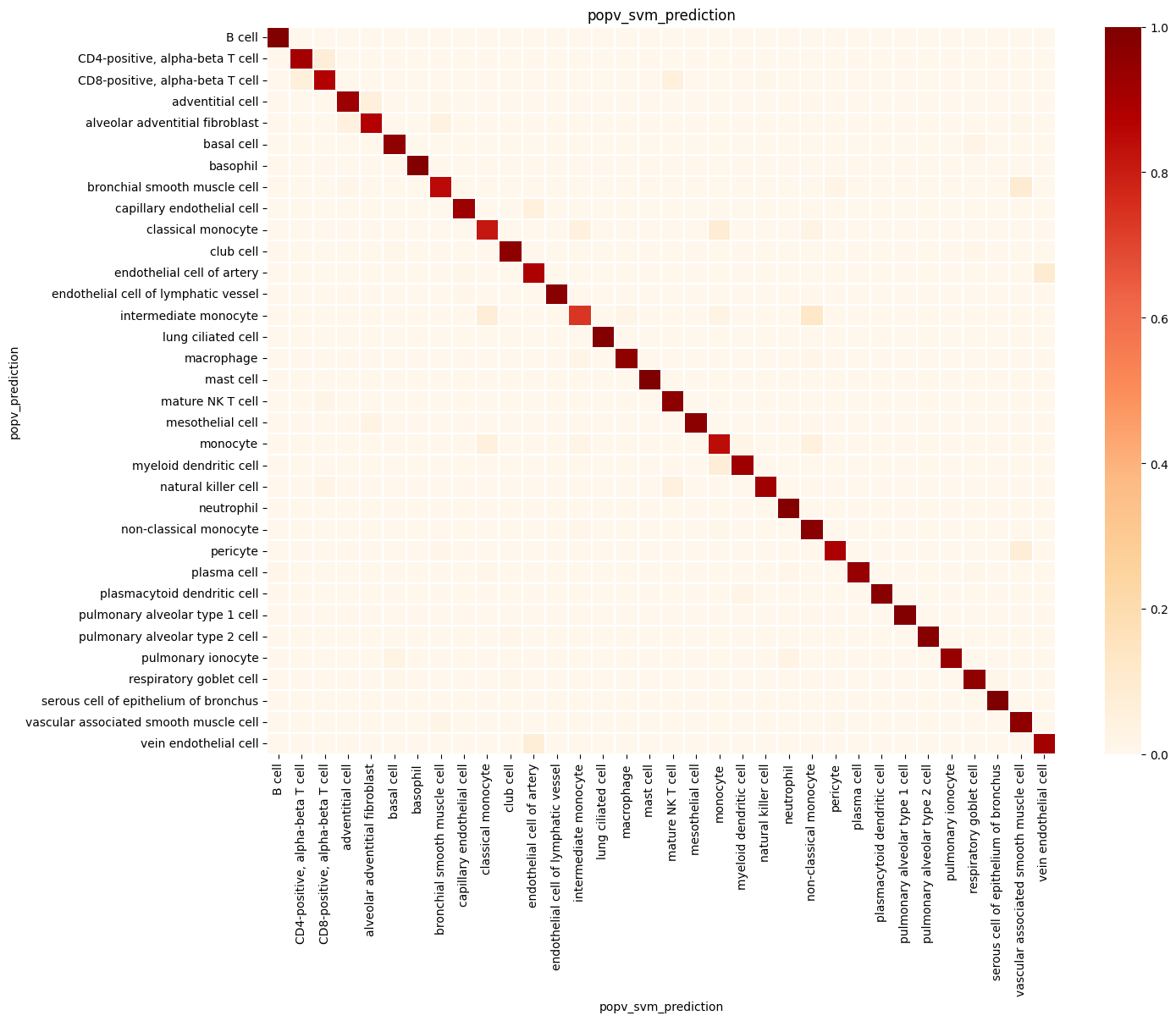
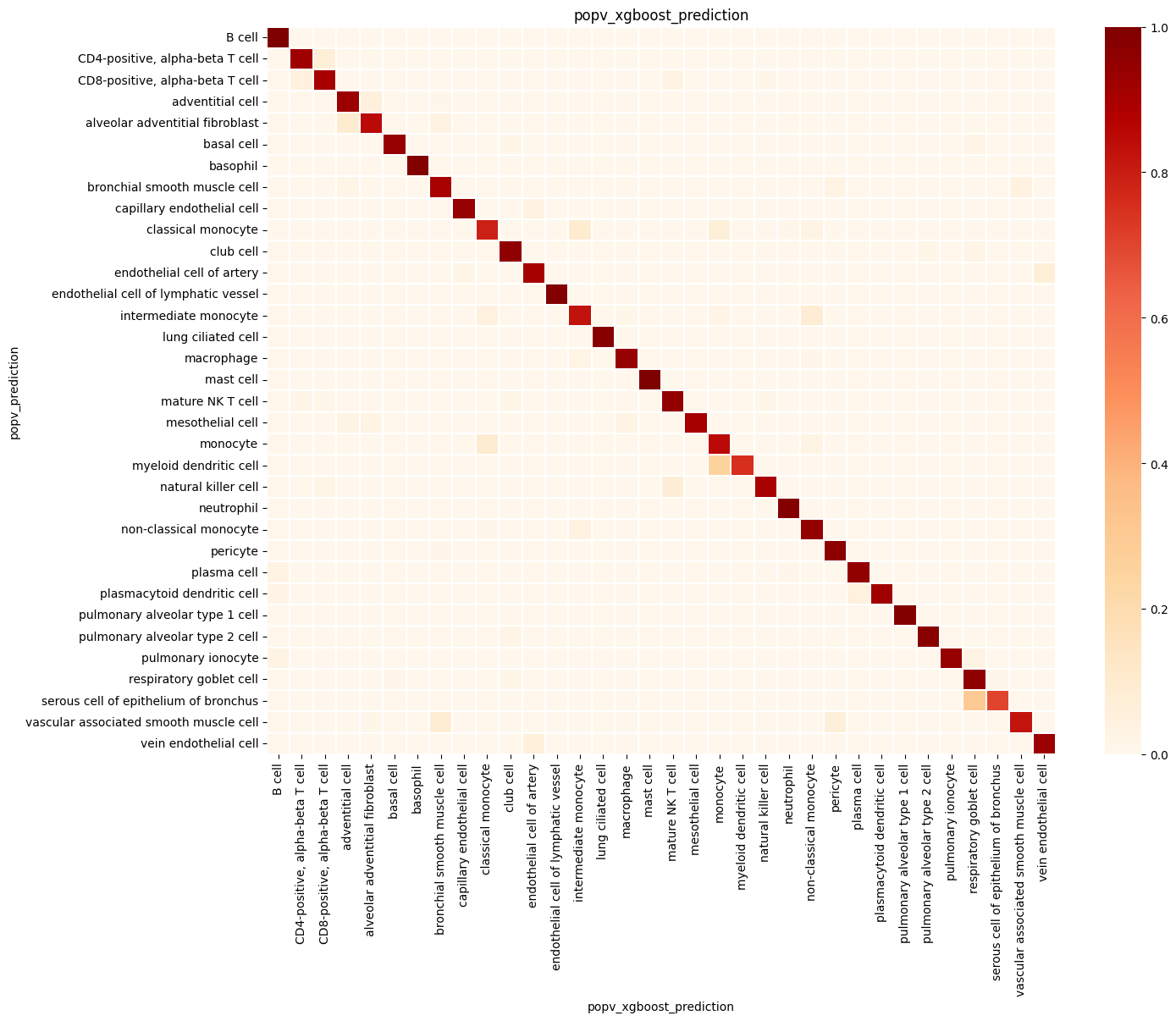
popv.visualization.make_agreement_plots(
    adata,
    prediction_keys=adata.uns["prediction_keys"] + ["popv_onclass_seen"],
)

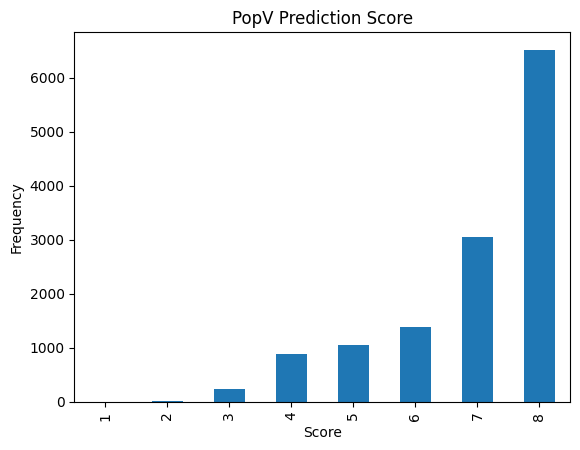
popv.visualization.prediction_score_bar_plot(adata, popv_prediction_score="popv_prediction_score")
<Axes: title={'center': 'PopV Prediction Score'}, xlabel='Score', ylabel='Frequency'>
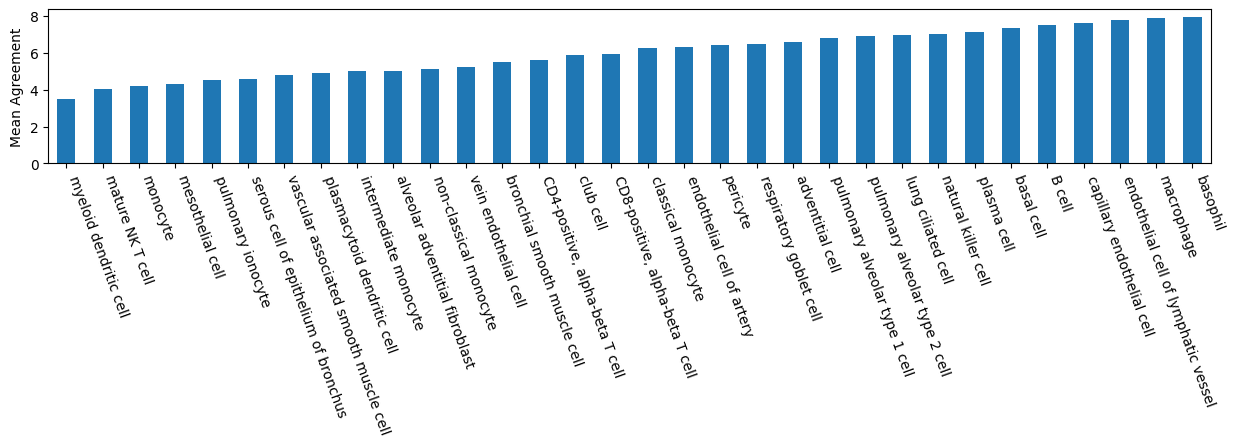
popv.visualization.agreement_score_bar_plot(adata)
<Axes: ylabel='Mean Agreement'>
Cell type proportion plot#
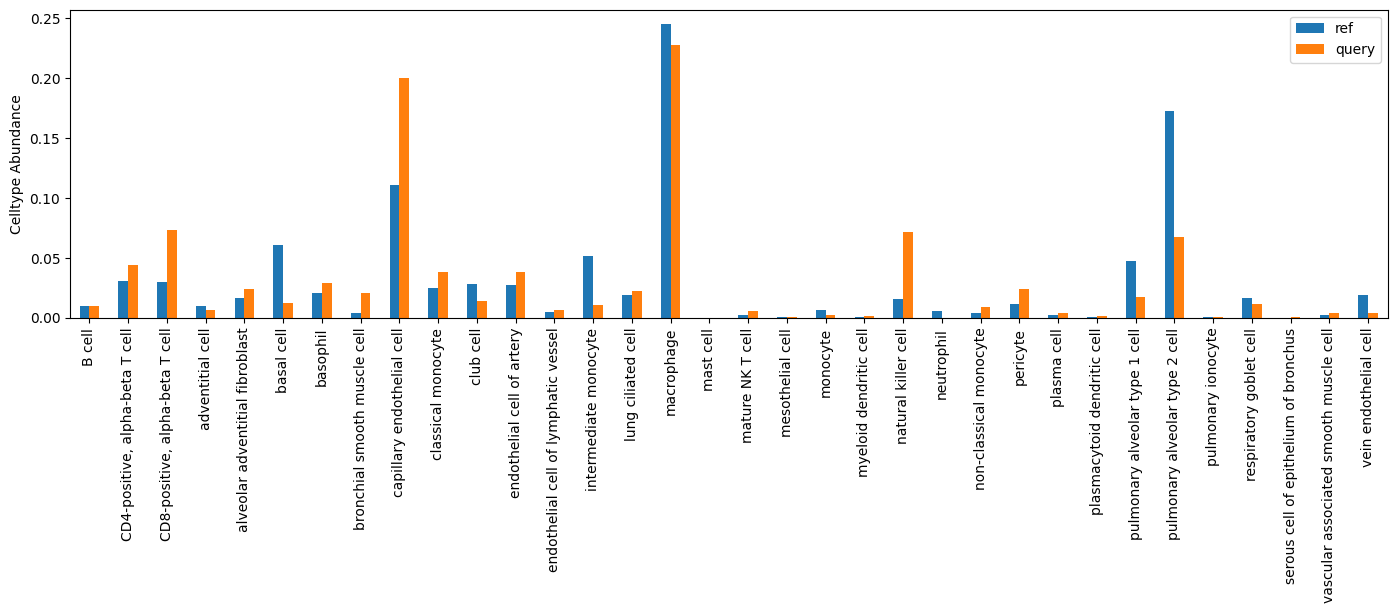
popv.visualization.celltype_ratio_bar_plot(adata)
<Axes: ylabel='Celltype Abundance'>